Main Was products : -
- MQ
- WAS
- HTTP SERVER
- PORTAL
- MESSAGE BROKER
- COMMERCE SERVER
Different editions of Was
1. Bases :- Chargeable but only works on single box
2. Express : Free only works on single box
3. Network Deployment : - Chargeable works on multiple box
What is deployment manager:-
DMGR in simple terms is Master and rest all is slave of it..
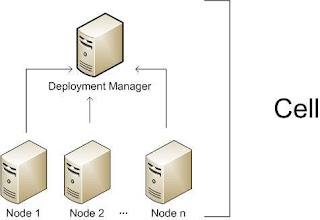
The Deployment Manager is a process (in fact it is an special WebSphere instance) responsible for managing the installation and maintenance of Applications, Connection Pools and other resources related to a J2EE environment. It is also responsible for centralizing user repositories for application and also for WebSphere authentication and authorization.
The Deployment Manager communicates with the Nodes through another special WebSphere process, theNode Agent.
The Deployment Manager is a process (in fact it is an special WebSphere instance) responsible for managing the installation and maintenance of Applications, Connection Pools and other resources related to a J2EE environment. It is also responsible for centralizing user repositories for application and also for WebSphere authentication and authorization.
The Deployment Manager communicates with the Nodes through another special WebSphere process, theNode Agent.
What is a Node
The Node is another virtual unit that is built of a Node Agent and one or more Server instances.
What is Node Agent
The Node Agent it the process responsible for creating and killing server processes and also responsible for configuration synchronization between the Deployment Manager and the Node. Extra care must be taken when changing security configurations for the cell, since communication between Deployment Manager and Node Agent is ciphered and secured when security is enabled, Node Agent needs to have configuration fully resynchronized when impacting changes are made to Cell security configuration.
The Node is another virtual unit that is built of a Node Agent and one or more Server instances.
What is Node Agent
The Node Agent it the process responsible for creating and killing server processes and also responsible for configuration synchronization between the Deployment Manager and the Node. Extra care must be taken when changing security configurations for the cell, since communication between Deployment Manager and Node Agent is ciphered and secured when security is enabled, Node Agent needs to have configuration fully resynchronized when impacting changes are made to Cell security configuration.
We need to node agent becoz to communicate other jvm's on other server, node agent does that. DMG'r ask node agent hey nodeagent do this or do that and nodeagent does that.
one box can have multiple nodeagents.
What is a server
Servers are regular Java process responsible for serving J2EE requests (eg.: serving JSP/JSF pages, serving EJB calls, consuming JMS queues, etc).
And to finish,
Federation in websphere
Federation meaning integrating single appserver with dmgr profile.
We use ./addnode command for acieving this.
What is Cluster
Clusters are also virtual units that groups Servers so resources added to the Cluster are propagated to every Server that makes up the cluster, this will in fact affect usually more than a single Nodeinstance.
What is Cluster
Clusters are also virtual units that groups Servers so resources added to the Cluster are propagated to every Server that makes up the cluster, this will in fact affect usually more than a single Nodeinstance.

Types of Server Profile:-
1. Cell
2. DMGR Profile
3. Application Profile
4. Custom Profile
Comments
Post a Comment